


Turn your Laptop into WIFI hotspot in One Click Without Software

If you work on laptop or use Blutooth adapter in PC , so you follow my guide for creating hotspot in Windows PC for sharing Internet Connection with Others Laptop and Mobiles.
You can create hotspot in Windows 7 and Windows 8 PC in just one click.
Follow my guide for finding Hidden Wireless Network.
Follow the below steps for create hotspot in Windows 7 for sharing Internet Connection.
1. Open notepad ,copy the below lines and paste in your notepad.
netsh wlan set hostednetwork mode=allow ssid=prophethacker key=prophethacker
netsh wlan start hostednetwork
2. Save your file in .bat format with quoted marks like "hotspot.bat".

3. Open your file with run as adminsitrator and your Hotspot is ready.
Now your Hotspot is ready but Internet Sharing is not configured . So this time you need to some simple task.
Configured Internet Sharing Settings
Now click Control Panel > Network and Internet > Network and Sharing Centre > , right-click your internet connection that you wanna share it and select Properties. Click the Sharing tab, check "Allow other network users to connect...", - and that's it.

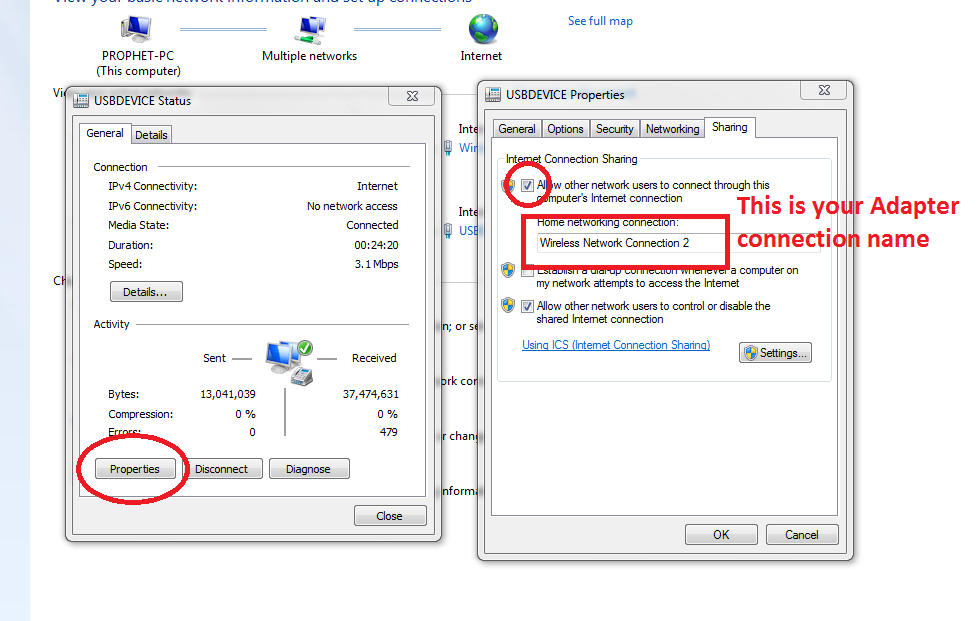

In above Picture You see Internet Connection is enable in prophethacker network that created by bat file.
So When you need Shared Internet Connection , you just need to right click on your hotspot.bat file with run as administrator. You don't need to do Configured Settings
Any nearby Wi-Fi enabled device should see a new network appear with the SSID you defined above. They'll be able to connect to it using your password, and can then immediately share your internet connection.
Share story!


